

Product and import costs
- Selling price, including and excluding VAT
- Purchase or manufacturing costs
- Packaging
- Import and freight costs
Free for up to 5 products
Revenue looks promising. But what’s left from each sale?
Calculate your margin after product costs, freight and Amazon fees. Test different prices and costs before committing money to a launch or your next order.
Calculate my margin for free →No credit card required.
Tool
Start with your current numbers. Then adjust your purchase price, packaging or freight costs to see how each change affects your margin per unit.
Check my product →The calculator currently uses Amazon fees for Germany (amazon.de). Selling in another marketplace? Get in touch and tell us which one you need.
How it works
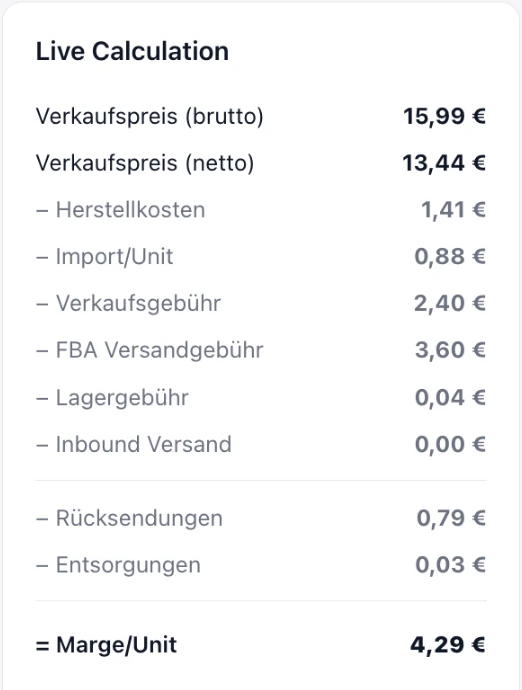
Add your selling price, product costs, packaging and freight. Nordstern42 calculates Amazon fees based on your product’s category, dimensions and weight.
View your margin per unit and margin percentage before PPC, with a breakdown of the costs included.
Try a different price, packaging size or supplier cost. See the effect immediately, before you commit to an order.
What the calculator includes
Product costs, freight and fulfilment all affect what’s left from a sale. Bring them together in one calculation.
Your result is the margin before PPC. Advertising, fixed costs such as software or staff, and taxes on profit are excluded. The amount shown helps you understand how much is available to cover those costs.
01 · New launch
Check your planned selling price against purchase, transport and Amazon fees before you place the first order.
02 · Reorder
Has your supplier raised the price? Has freight become more expensive? Calculate with the new costs before you tie up capital again.
03 · Optimise packaging
Compare your current and your new packaging with the matching dimensions, weights and costs.
04 · Shipping tier changes
Check what a different FBA fee means for your amount per unit before you set the price or packaging.
The result
See selling price, costs included, amount per unit and margin together. That way you see which assumption changes your result, and you can compare variants. It turns the Amazon FBA calculator into a tool for your next decision, not just a fee calculator.
Calculate my marginYour data
You enter your numbers manually. The margin calculator does not need access to your Seller Central account.
Your details are stored on servers in Frankfurt am Main and are not passed on to third parties.
Christine, founder of Nordstern42, sells on Amazon herself — born out of her own launch, which tied up more capital than planned.
Whether it is a launch, a reorder, new packaging or a different shipping tier: open the calculator, adjust your numbers and see what is left.
Sign up for free and startNordstern42 starts with the free margin calculator. The cash flow forecast and the decision dashboard follow next.
Enter the dimensions, weight and category of your product. The calculator determines the size tier, the FBA fulfilment fee and the referral fee, and deducts them from your net price.
Besides purchase and freight, mainly the referral fee (a percentage depending on the category), the FBA fulfilment fee (depending on size and weight), storage fees, and costs for returns and disposals. Advertising costs come on top, and the calculator shows them separately.
That depends on your numbers — exactly what the calculator is for. You see the amount per unit and the margin before PPC, and you can check how a different price, supplier or packaging changes the result.
No. The calculator runs online and saves your products, so you can compare variants later without maintaining a spreadsheet.
Yes. You can register for free and use the margin calculator for up to 5 products.
No. For the margin calculator you enter your numbers once, manually. An Amazon connection is only planned for later features such as the cash flow forecast.
Your selling price and the costs you already know. The calculator shows which further details are missing for a meaningful result.
No. The result shows your margin before advertising, meaning before PPC costs are deducted. A "margin after advertising" view is planned for later.
It shows what is left per sale under the assumptions you entered. You still need to judge demand, competition and future costs yourself.
The margin calculator is free for up to 5 products. If you need more, contact christine@walddigital-ventures.de.